1
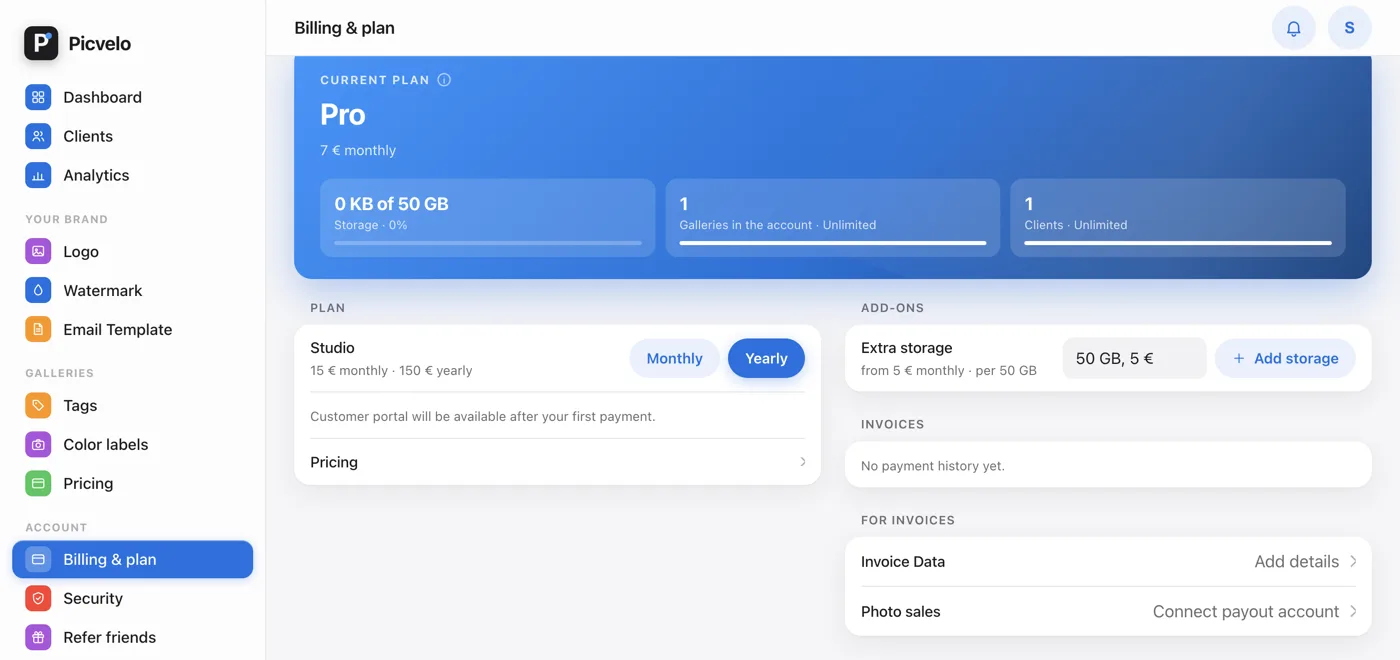
Open the Add-ons section
In the Billing & plan tab, below the Plan section, there's an Add-ons section. There you'll find Extra storage: a 50 GB pack for 5 EUR a month.
2
Choose how many packs
From the How much extra storage? list, pick 50 to 500 GB (1 to 10 packs) and click Add storage. The space adds to your plan's limit. You pay through Stripe, just like the subscription.
🔒 Secure payment by Stripe
Card number4242 4242 4242 4242
Expires12 / 28
CVC•••
3
Manage add-ons in the Stripe portal
To change the number of packs or cancel them, click Manage Subscription to open the Stripe portal. The panel shows your current add-ons.
Saved payment method
Visa •••• 4242Expires 12/28
4
Cancel when you no longer need it
Click Cancel subscription in the Plan section of the Billing & plan tab. The button opens the Stripe portal, where you confirm. Your subscription runs until the end of the paid period, then the account moves to the Free plan. Your photos stay; only the Free limits start to apply.
Renewal cycle
Today
June 14
June 14 - renewal