Decide what you sell
You set up sales separately in each gallery, so one session can have extra charges and another can have none. On the gallery page, click Gallery settings and scroll to Additional gallery photos. You'll find three fields there and two completely separate offers:
- Charge for extra photos: the Photos included and Price per extra ($) fields. Your client gets as many photos as you enter in the session price and pays for each one beyond that.
- Whole gallery: the Full gallery ($) field. One price for the complete set, no matter how many photos the client picked.
You can turn on one of them, both, or neither.
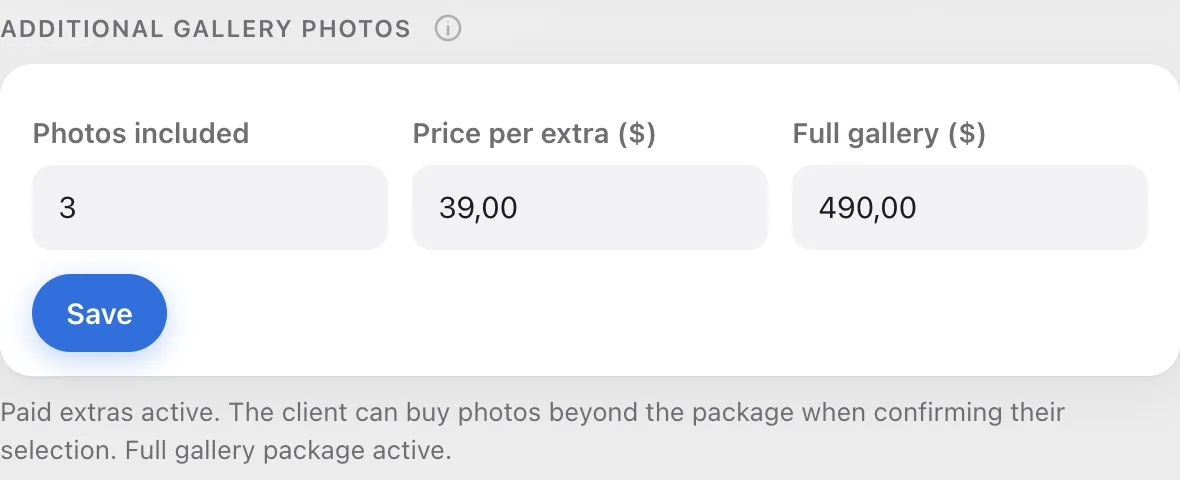
Decide how you want to get paid
There are two ways, and the state of your payout account picks one for you.
- You have a connected payout account: your client pays by card on the Stripe page right when they confirm their selection. The money goes straight to your account, and Picvelo takes 2 percent.
- You don't have a payout account: your client places an order in the gallery, and you settle up directly, for example by bank transfer or in cash. Picvelo takes nothing, but you confirm on the gallery page that the money arrived.

Wait for your client's selection
Your client browses the gallery and picks photos. When they go over the package, their counter shows the extra photos, and confirming the selection adds a payment or an order.

Deliver the photos after payment
Until the payment comes in, downloading the selected photos is locked, for you too. That's on purpose: if the ZIP could be downloaded earlier, the extra charge would be optional. After payment (by card, or after you confirm a direct payment) the lock goes away and you deliver the photos as usual.