Search for a photo by file name
There's a search field above the thumbnail grid. Type part of a name (for example IMG_4521) and the list narrows down without reloading the page.
Next to it is the order menu: Default order, Photographer's choice first, Selected first, By name, and, once your client has left a comment, Commented first. Sorting covers the whole gallery, not just the current page.
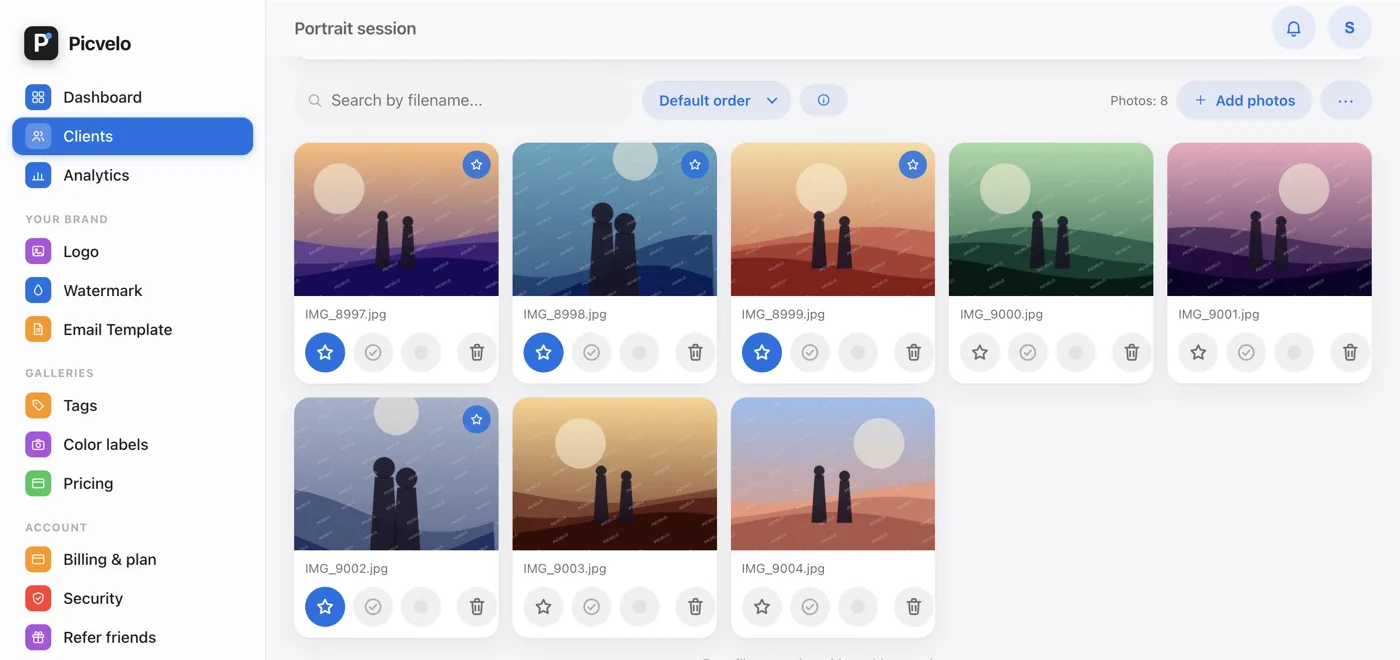
Recognize photos by their markers
On a thumbnail you can see right away:
- a star: your recommendation for the client,
- a green check mark: the client's pick,
- a heart and an X: the client's favorites and rejects,
- a colored dot in the action row under the thumbnail: the color label from culling.
Open the cheat sheet with the i icon (What the dots mean) next to the order menu.
Your client has three gallery views
In their gallery, your client switches the order: Photographer's choice first (that's how the gallery opens), My choice first and Default order. The first mode moves your recommendations to the top of the grid. Next to them are the Favorites only and Hide rejected filters.